Washi Audio

Building stuff we couldn’t find.

English

Libreria

sample + midi librarian

you already own the sound.
find it in a second.
drag it into the song.

A desktop app for the sample packs and MIDI files you already have. Search them in plain words, hear anything with one click, and drag it straight into your DAW. Your files are never moved, renamed or copied.

$29launch price
until Dec 18, then $39
Buy Look inside Free trial
Windows 10 and 11 · A desktop app, not a plugin
Pay once, use it forever · Full refund within 14 days
Libreria: the sound playing on top, the list of sounds below and the details panel on the right.

Ask for a sound.

Type it the way you’d say it. Libreria works out which words are a type, a tempo, a key or a genre, and shows you what it understood. There’s no AI and no cloud behind it: everything runs on your computer.

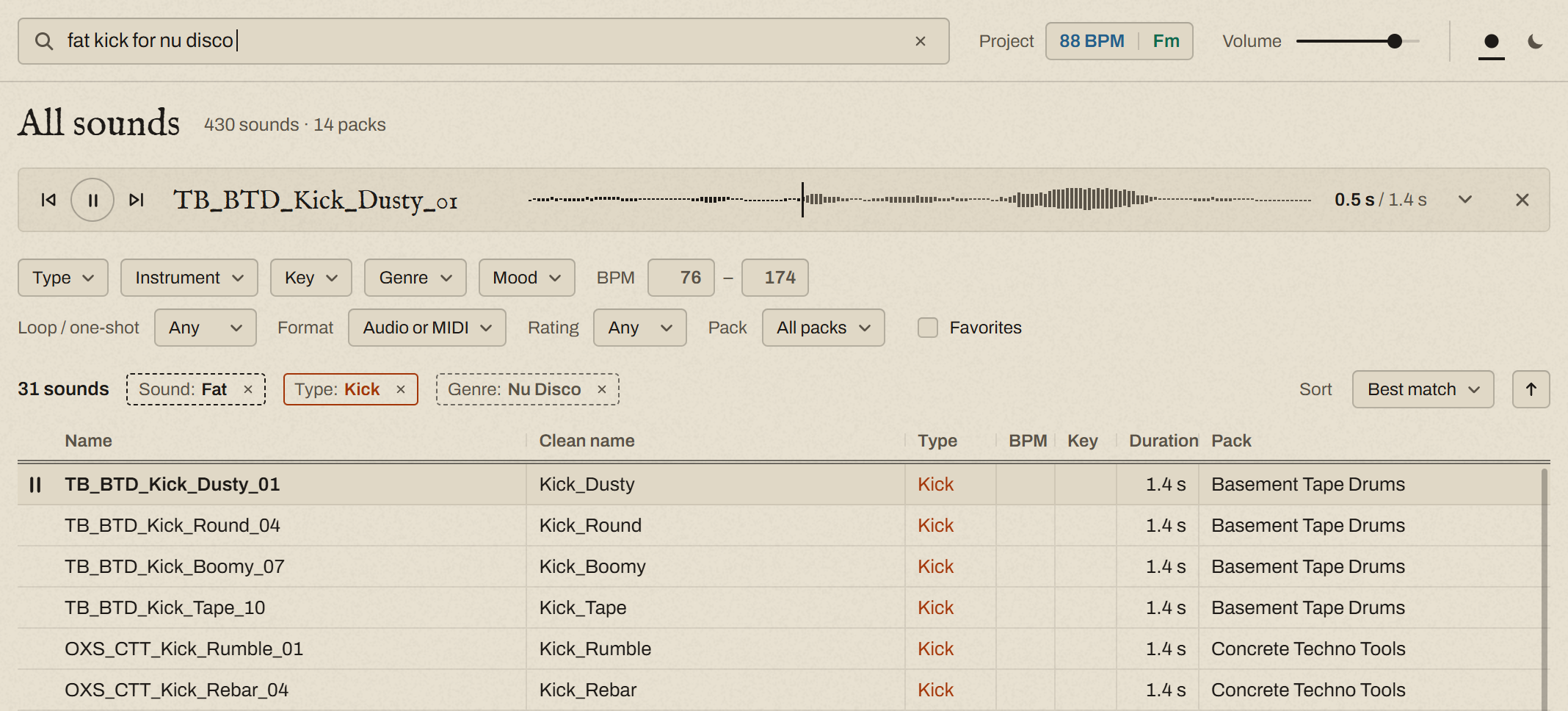
The search “fat kick for nu disco”. Under the filters, three chips show what Libreria understood: Sound: Fat, Type: Kick, Genre: Nu Disco. Below them, a list of kicks.

A solid chip filters.

Kick is a type, so only kicks stay. Instruments, tempos and keys work the same way.

A dashed chip sorts.

Fat describes a sound, so the fattest kicks come first. Libreria goes by the file name and by the sound itself (it listens to every file once, in the background), so words like bright or punchy work even on a file called Kick_01.

Too few? It loosens up.

When a genre or a mood would leave almost nothing, it stops filtering and only sorts. The × on a chip drops that word.

One sound, one card.

Packs often ship one loop as several files: the audio, the MIDI behind it, a dry version, a second take. Libreria puts files that share a name on one card, so you look for a sound, not for its files.

Click a sound and it plays. The waveform and the notes are drawn from the files themselves. MIDI plays through a small built-in synth and drum kit, or through a SoundFont of your own.

Then drag it into the song.

Drag a sound from the list into your DAW, and the original file lands on the track. Nothing is copied, converted or exported on the way.
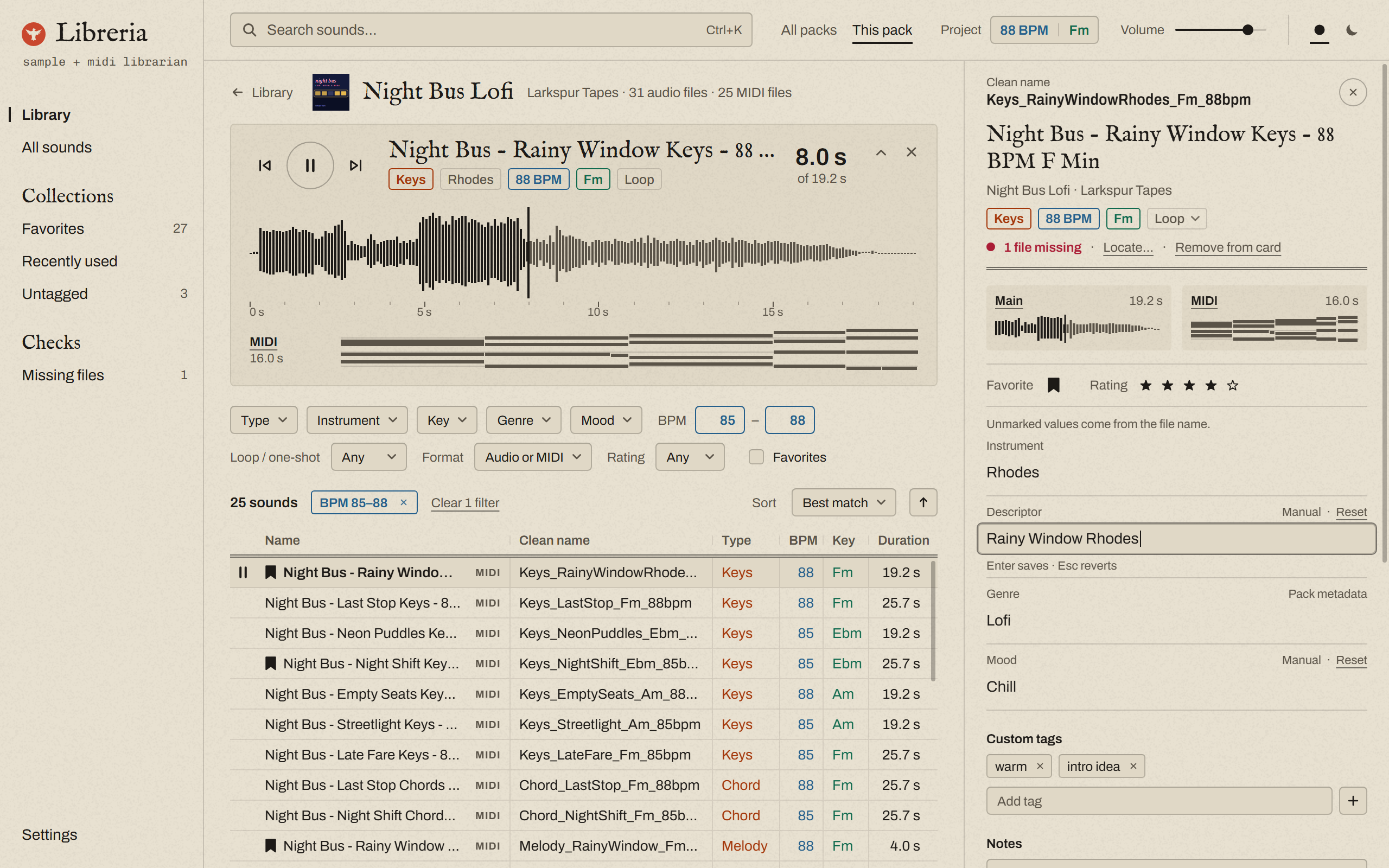
A pack with one sound playing: the audio on top and, under it, the MIDI from the same card. The rows marked MIDI are cards that have both.
The details of one sound. Each value says where it came from: the file name, the pack, or you.

It reads the file names.

The tempo, the key and the kind of sound are usually written in the file name, or in the folders around it. Libreria reads them. Each one keeps its color everywhere in the app: orange for the type, blue for the tempo, green for the key.

It also writes each sound a clean name from those values, like Keys_RainyWindowRhodes_Fm_88bpm, following a pattern you can change.

You get the last word.

When it reads something wrong, fix it once. Your edit always wins, and a rescan never undoes it. Add your own tags, notes, ratings and favorites, too. All of it lives in Libreria’s own folder, never inside your files.

Find it by its rhythm.

Sometimes the groove is all you know. Give Libreria a rhythm, and it finds the MIDI files that play it, or something close to it.

Rhythm search reads MIDI files.

  • Draw itClick the steps on a 16-step grid: one line, or kick, snare and hi-hat.
  • Play itRecord it on three keys of your computer keyboard, or on a MIDI keyboard or pad. Each pass adds to the last one.
  • Borrow itFound a sound with the right feel? “Same rhythm” lists the others.
  • Drop itDrop a MIDI file on the window, and Libreria looks for its rhythm.

Your files stay put.

Point Libreria at the folders you already have. It only reads them, and shows every pack with its own cover.

  • Nothing is moved, renamed or changed. Everything Libreria writes goes into its own folder.
  • Nothing is uploaded. Your library, the search and the listening all stay on your computer. Only activation goes online.
  • Nothing you did is lost. Remove a folder, and your tags, notes and ratings are kept. Add it again, even from another drive, and they come back.
  • A missing file says so. Libreria flags it, and you can show it where the file went.
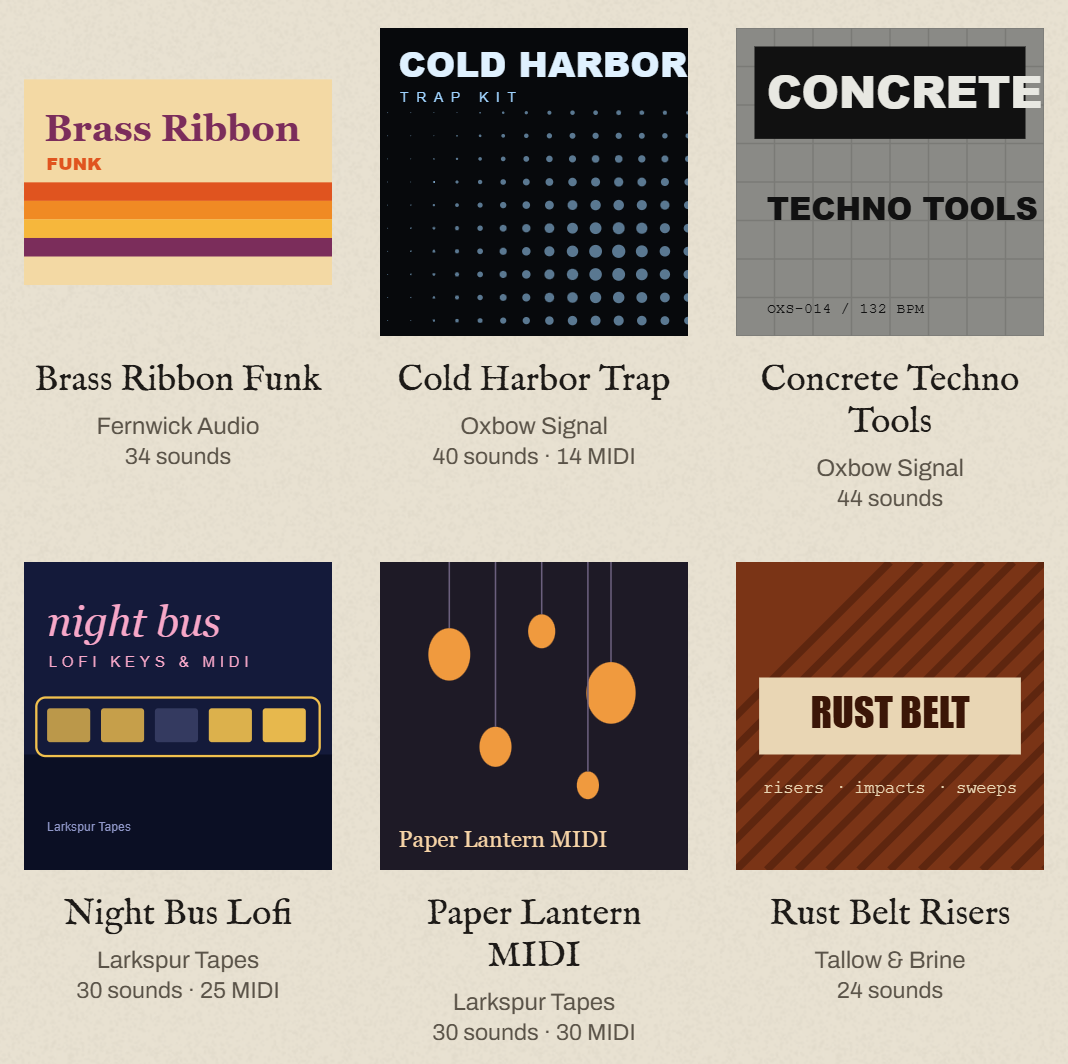
Six packs in the library, each with its cover, its name, its company and how many sounds and MIDI files it has.

The library. Covers are shown whole, the way the pack came.

Pay once. Keep it.

No subscription. No account needed to use it. No need to stay online.

Yours for good

One payment. Every update is free.

Three computers

Activate up to three. Free one up yourself from inside the app, even if that computer died.

Works offline

Activate once, then use it offline forever. When you’re online, it quietly checks in once a month.

No lock-in

Your files never change. If you stop using Libreria one day, your library is exactly as you left it.

Your data

Activation sends your license key, a hashed computer ID, and your computer’s name. Nothing about your library or how you use the app.

Try it first

The free trial is the whole app for 14 days. After that, it asks for a key, and nothing you did is lost. Bought it and it’s not for you? Full refund within 14 days.

Details

Format
A desktop app for Windows. It is not a plugin.
System
Windows 10 and 11, 64-bit
Audio
WAV, AIFF, FLAC, MP3 and OGG
MIDI
Standard MIDI files, played by the built-in synth or by your own SoundFont
DAW
Any DAW that takes files dragged in from another program
Library size
Tested with 100,000 sounds
Internet
Only to activate
Language
English and Portuguese

Libreria

sample + midi librarian
$29launch price
until Dec 18, then $39
Buy Full refund within 14 days.